Button hints that know what you’re playing with
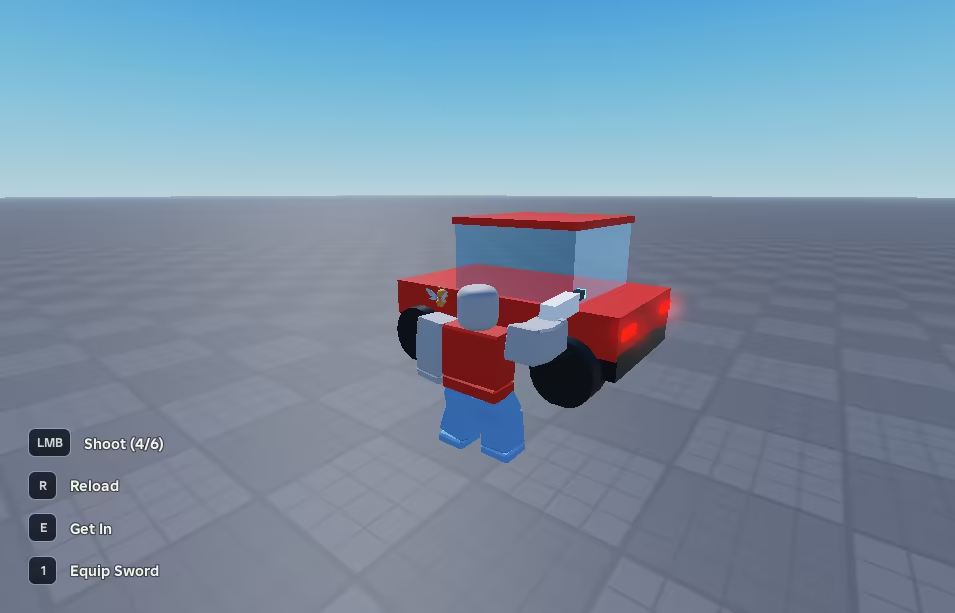
Some games use a small row in the corner of the screen to tell you which button does what: [E] Talk, [LMB] Cast, [Space] Jump. It looks like a tiny feature until you remember that the player might be on a keyboard, an Xbox controller, a PlayStation controller or a phone, that a French keyboard has the A where the Q should be, and that half the game wants to put something in that row at the same time.
OpenRAHS is that row as a free, open source library for Roblox. I built it for Rod and Reef, the fishing game where I’m lead developer, and then pulled it out so any game can use it.
What it does
- Shows the right button for whatever the player is holding, and switches the moment they pick up a controller or put it down. PlayStation controllers get their own symbols (×, R2, Options).
- Reads the player’s keyboard layout, so someone on an AZERTY keyboard sees the letter that’s actually printed on their key.
- Shows each hint only when it applies: holding a weapon, standing next to a car, sitting in it. A hint’s condition is one line of code.
- Teaches once. A tutorial hint can go away for good after the first time the player uses it.
- Follows rebinds. If the game uses Roblox’s Input Action System, changing a key in the settings updates the hint on the spot.
- Never touches the controls. It only watches the input, so it can’t steal a key from the game or break anything.
- Works out of the box. Until you upload icons it draws clean text keycaps, and it comes with 640 free icons and a script that uploads them to your account.
- Takes on the look of your game, from one colour to a whole new design, and respects the player’s Reduced Motion setting.
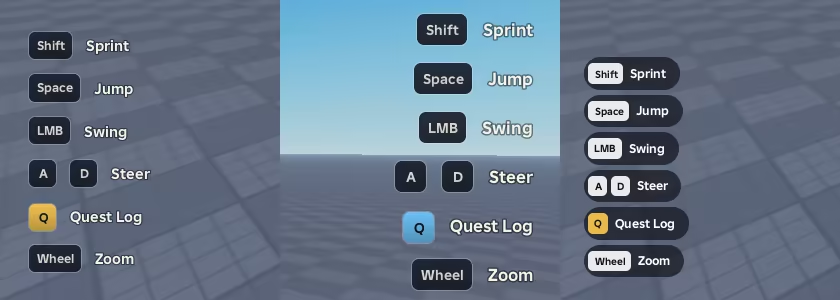
Here are the same six hints in three styles: the default one, a theme with another colour and corner, and a design written from scratch.
Try it
It’s on Wally as mastedore/openrahs, and the documentation is at mastedore.github.io/OpenRAHS. The repository includes a playground place with a sword, a blaster, a car you can drive and a guide to talk to, where you can watch every hint come and go.
How it decides what to draw, the contract behind the custom styles and the math in the animations are in the portfolio version.