Scale
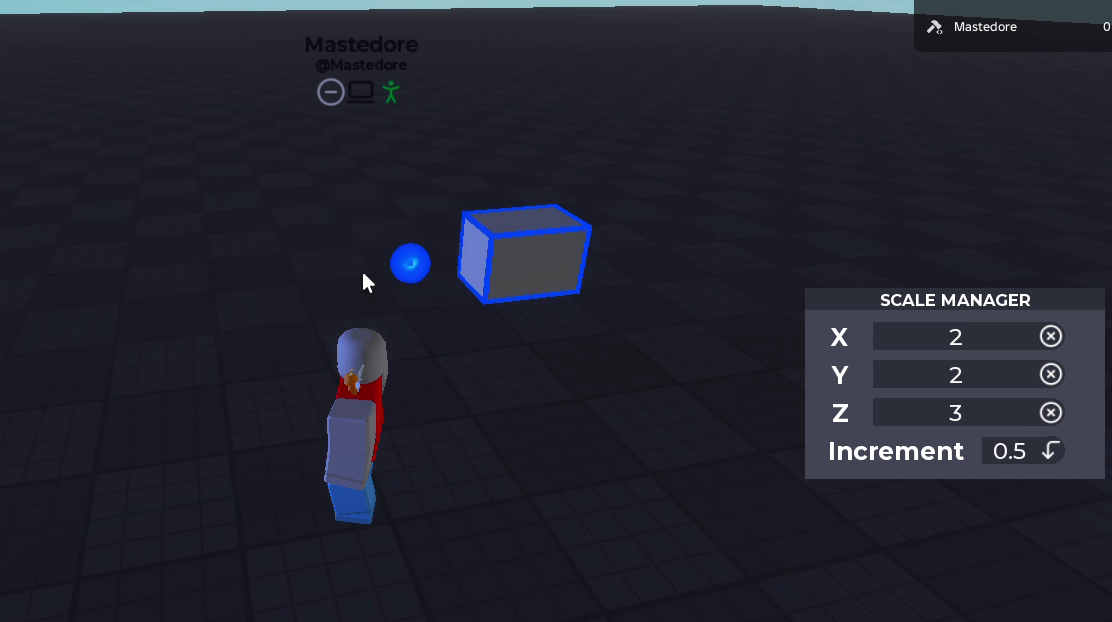
The scale tool (Z) is the one I’m proudest of. You grab a face of a block and pull it, the way you’d expect a building tool to work.
How it works
- Select a block and six handles appear, one per face.
- Dragging a handle grows or shrinks the block towards that face. The opposite face stays where it was, even if the block is rotated.
- The size changes in steps of the increment you choose, from 0.01 to 4 studs.
- You can also type an exact size in the Scale Manager window. Typed sizes grow from the centre instead of from a face.
Under the hood
Roblox resizes parts from their centre, so every time the block grows, the tool also moves it half of what it grew towards the face you’re dragging. That math, a snapping formula that only behaves when you drag slowly, and the first version, which shrank blocks when you pulled half of their faces, are in the portfolio version.