Building tools I wrote at twelve.
Note
This is code from 2021 and 2022, and I’m not going to improve it. The articles describe it as it is, bugs included, because reading it with what I know now is the point.
Abstract. Blocks Simulator is a Roblox building sandbox. You join, place blocks and shape them with six tools, each on its own key: Q builds, E deletes, Z scales, X moves, C rotates and F paints. I started it in 2021, when I was 12, and kept rewriting the tools into 2022. The first versions were Roblox Tools that I signed as juank. The ones that shipped are windows opened from the top bar, signed as SolarDev, and two of them carry a note in Spanish dated May 2022 saying they replaced the old ones. Underneath there’s one server script that receives every tool’s request, checks it, applies it and answers every rejection with a hexadecimal error code. This page is an index. It describes how the game is organized and how a request travels from a tool to the server, and it links to one article per tool where I go through the math, which is the part that cost me the most at the time.
1. My role
I made it alone: the tools, their windows, the server side and a small framework of my own, SolarFramework, with a maths module (Tena) and a per-block permissions module (Solar3). The early scripts start with “script hecho por juank” and the later ones with “Made by SolarDev”. Both are me, under the names I used back then.
Not everything in the place is mine. The top bar icons use TopbarPlus, the windows are dragged with Spynaz’s DraggableObject, and the admin commands, the music player and most of the gear came from the community. None of that is covered here.
2. Built like an operating system
At some point I decided the game should look like a computer. Each tool is a ScreenGui named like an executable (new.exe, Transform.exe, Color.exe, Delete.exe) with a Main.lua as its entry point, and each section of a window is a frame whose name ends in .dll. A BindableFunction is a .cmd, a BindableEvent is Signal.js, and every player gets a folder in the Workspace called PlayerName.reg, like a registry, which holds their blocks and a few settings. If new.exe starts without its window it throws “This program cannot be run on free mode”, a nod to the “This program cannot be run in DOS mode” that Windows executables carry for anyone who runs them under DOS. Transform.exe even ships the full text of the Apache License 2.0 inside a ModuleScript.
The metaphor had one useful consequence. Every program has an ED.lua (“Enable/Disable Manager”) that toggles it from its top bar icon or its key, and turning a tool on or off means enabling or disabling its Main.lua. Disabling a running LocalScript stops it and drops all its connections, and enabling it runs it again from the top, so a tool really behaves like a process that starts and dies. Transform.exe does this for three tools at once and keeps them mutually exclusive: opening Scale stops Move and Rotate and clears their selection boxes. TopbarPlus fires its selected event even when the code itself selects an icon, so each ED.lua guards its handlers with a flag to keep a toggle from calling itself.
3. From the tool to the server
3.1 Preview on the client, commit once
The transform tools work on the client first. While you drag a handle, the tool changes the block’s Size and CFrame locally, so the block follows the mouse with no network delay. Only when you release the button does it send one message with the final state. The server applies it, and replication then overwrites the client’s local copy with the server’s value, which is the same one. The first versions did it the other way around and fired the remote on every drag event, which while the mouse moves is about once per frame.
3.2 One table, seven remotes
On the server, everything goes through one script, ReplicateMgr.lua. Its core is a table that maps a name to a remote:
local Runtimes = {
	["Print"]	=	RemoteControllers.PrintToClient;
	["Build"]	=	RemoteControllers.PlaceRep;
	["Color"]	=	RemoteControllers.ColorRep;
	["Delete"]	=	RemoteControllers.DestroyRep;
	["Scale"]	=	RemoteControllers.ScaleRep;
	["Move"]	=	RemoteControllers.MoveRep;
	["Rotate"]	=	RemoteControllers.RotateRep;
}
and every handler below it hangs off Runtimes.Build, Runtimes.Scale and so on. Build and Delete are RemoteFunctions because the client waits for an answer. Delete, for example, destroys the block locally when the server says it doesn’t exist there, which cleans up parts that only lived on the client. The other four are RemoteEvents, fire and forget.
| Tool | Remote | What the client sends | Error codes |
|---|---|---|---|
| Build | PlaceRep, function |
position, anchored, protected, material, shape, type, transparency, reflectance | none |
| Delete | DestroyRep, function |
the part | 0xBA, 0xBB |
| Scale | ScaleRep, event |
the part, its size and its CFrame |
0xCA to 0xCD |
| Move | MoveRep, event |
the part and its CFrame |
0xDA to 0xDC |
| Rotate | RotateRep, event |
the part and its orientation | 0xEA to 0xEC |
| Color | ColorRep, event |
the part and a Color3 |
0xFA, 0xFB |
Every handler climbs the same ladder of checks. First, that the arguments arrived. Then, that the target is a BasePart, isn’t Locked and isn’t part of a character (Delete also refuses the baseplate). Last, that the value has the right type, with typeof. Only then does it assign the property. Each rung that fails answers the client through PrintToClient with a severity level (0 a warning, 1 an unhandled exception, 2 a fatal one), a code and a message. The codes follow a rule I wrote in a comment on the client, 0xQW, where Q is the program’s index and W the error’s. 0xCB is Scale (C) rejecting its target (B), and 0xDA is Move (D) missing an argument (A).
What I still like about it is that it’s uniform. The tools speak one protocol, every rejection can be traced to a line of code by its code, and adding a tool means adding a row to the table and a handler that climbs the same ladder.
3.3 What it costs
It’s also inefficient and too trusting, and both things are easy to see now.
- Errors travel through
InvokeClient, aRemoteFunctionthat the server calls on the client. The server’s thread waits until the client returns, so a client that never answers keeps that thread waiting forever, and a client that errors throws inside the server’s handler. All of that to print a line, which aRemoteEventwould have done without waiting for anything. - The server checks types, not values. Scale accepts any size and any
CFrame, so a modified client can stretch a block to the size limit or send it across the map, and nothing limits how often a client fires. - Protection is never enforced. The Build window has a Protected option, described as keeping your buildings “unalterable by other players”. Solar3 stores the owner on the block, but no handler reads it, so anyone can move, paint or delete anyone’s blocks. On top of that,
Solar3.Newsets every permission attribute on the block to “allowed”. - Storing that owner costs a web request per block, because Solar3 looks up the player’s UserId with
GetUserIdFromNameAsync(player.Name)whenplayer.UserIdwas right there. - Seven remotes and six handlers, four of them nearly identical. One remote that carries the tool’s name, with the ladder written once, would have been the same dispatcher with a fraction of the code.
4. The tools
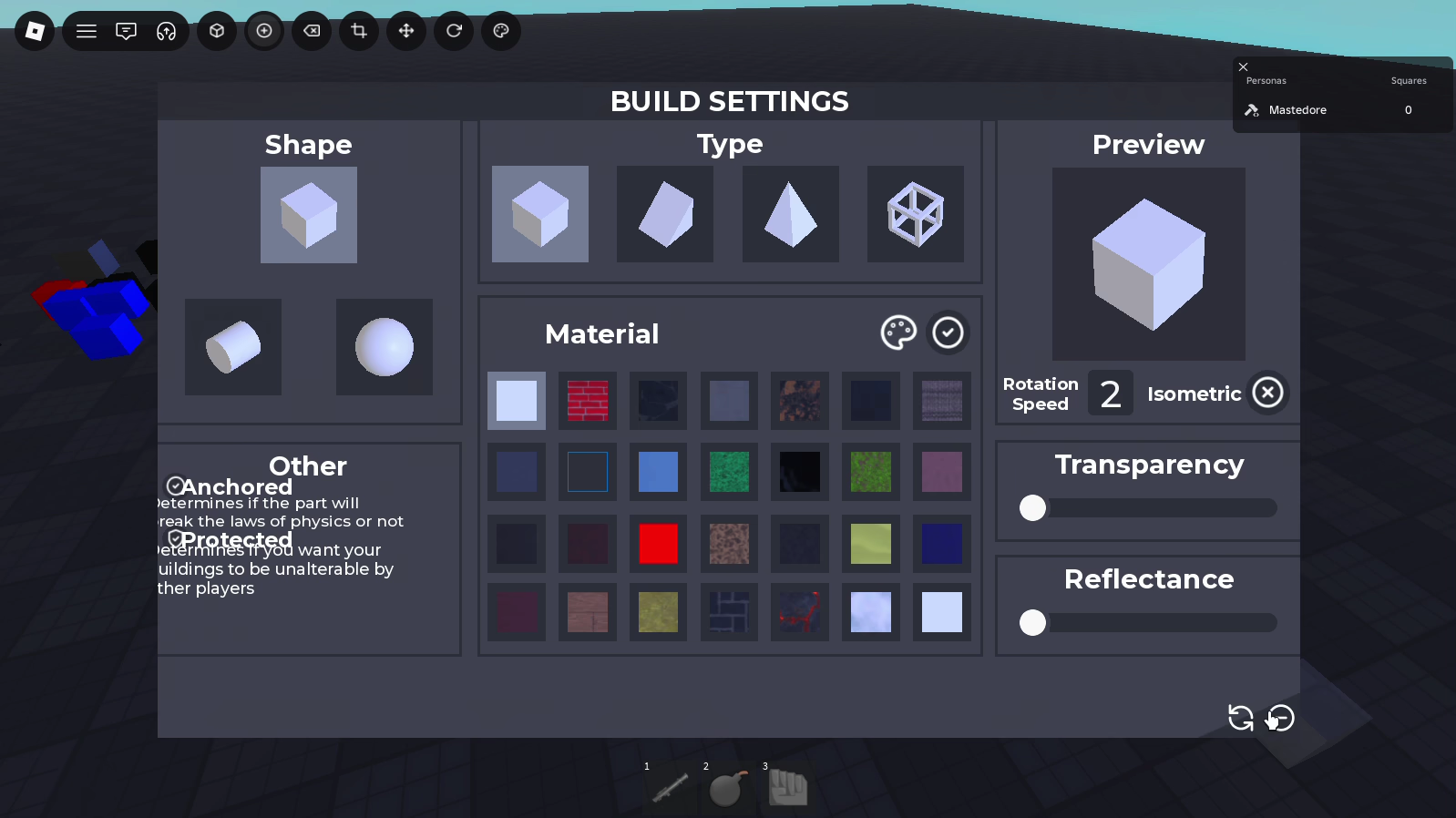
- Build. A settings window whose state lives in the attributes of a
BindableFunction, a 3D preview that swaps its part’s class when you change the type, and a ghost block that snaps to the grid against the face you point at. The article explains why that rule is flush on some faces and overlaps on others once blocks leave the grid. - Scale. Dragging one face grows the block towards that face only, rotated or not, by shifting it half of what it grew. It covers the six direction vectors, a snapping formula that mixes units and only behaves when you drag slowly, and the first version, which shrank the block when you pulled three of its six faces.
- Move. One line moves the block along its own axes in snapped steps. The article covers why rounding up makes moving forward and back asymmetric, and a bug that sent rotated blocks somewhere else when you typed a coordinate.
- Rotate. Arc handles that turn the block around its own axes and snap to the nearest increment. Only three numbers reach the server, and the three angle fields in the window turn out to be three different kinds of rotation.
- Color. A colour wheel built from an angle and a distance, RGB, HSV and hex fields kept in sync, an eyedropper, and a value slider implemented as a tint on the wheel’s image, which is exact because of how HSV is defined.
Delete has no article of its own. It outlines the block under the mouse, asks the server to destroy it, and if the server answers that the block doesn’t exist there, destroys the local copy.
5. What I took away
The part I’d keep is the shape of the system: tools that preview locally and commit once, and a server with one protocol and readable error codes. What I’d change is where the trust sits. Every handler checks that the data has the right type and none checks that it makes sense, and the one feature that promised protection never ran. The math is the part I’m still proud of. Getting a block to grow from one face and to turn on its own axes took me a long time, with forum threads open, and reading it now I can tell which parts I understood and which ones I adjusted until they worked.
This text by Mastedore. All rights reserved.